


Exploring ChatGPT Advanced Voice Mode: A Revolutionary Step Forward
- RayCee the Artist

- Oct 6, 2024
- 5 min read
Updated: Oct 10, 2024
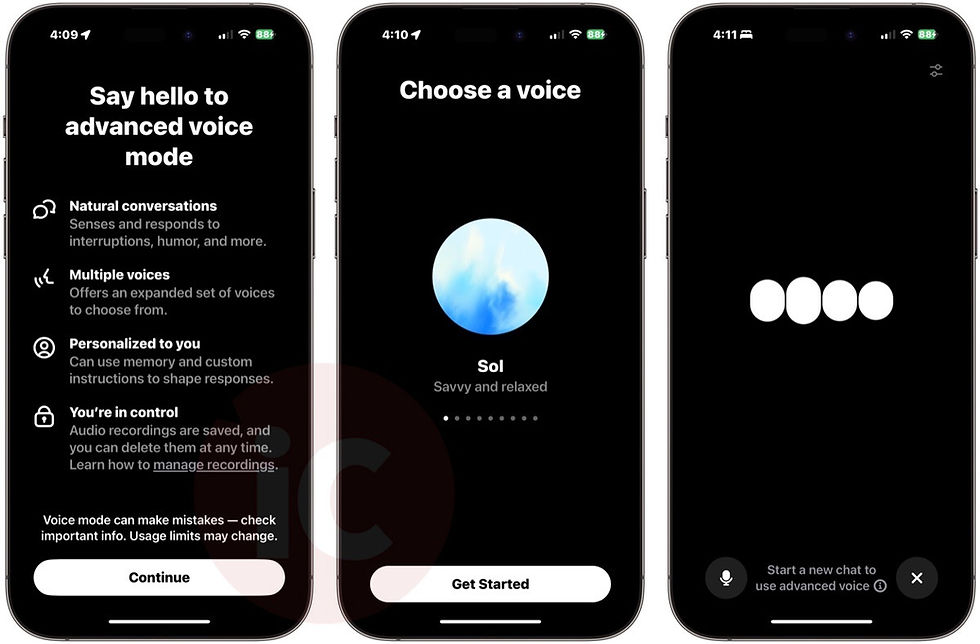
With the rise of artificial intelligence, the ways we interact with technology are evolving rapidly. One of the latest and most exciting innovations is ChatGPT’s Advanced Voice Mode—an enhancement that makes communicating with AI feel more natural, intuitive, and human, unlike traditional AI communication features that rely solely on text input. Imagine asking questions, having in-depth conversations, or getting guidance, all without having to type. With Advanced Voice Mode, that’s now a reality.
What Is ChatGPT's Advanced Voice Mode?
ChatGPT’s Advanced Voice Mode brings a new layer of communication to AI interactions: voice-based conversations. Instead of typing your questions or requests, you can now talk to ChatGPT as if you’re speaking to another person. Using advanced speech recognition and natural language processing, including technologies like deep learning and neural networks, ChatGPT can understand your spoken words and respond to you in a conversational tone.
This ChatGPT voice mode feature uses state-of-the-art text-to-speech synthesis, allowing ChatGPT to generate responses in a human-like voice. The voices are smooth and lifelike, aiming to provide an experience similar to chatting with a real person. The option to choose from different voice styles also allows users to personalize the experience, making it more relatable and enjoyable. For example, users can select from a calm, friendly voice for relaxed interactions, a more energetic voice for motivation, or an authoritative tone for tasks requiring focus.
Key Features of Advanced Voice Mode
Seamless Voice Interaction
Just press the microphone button, speak your query, and listen as ChatGPT responds. This makes interactions effortless and accessible for users who may prefer voice communication over typing.
Natural and Lifelike Responses
Thanks to advanced text-to-speech technology, ChatGPT can respond using human-like intonation and cadence. This makes interactions feel more immersive and less robotic, bridging the gap between technology and human communication.
Multi-Voice Options
Users can choose from a variety of voice styles (with improved accents) to suit their preferences. Whether you want a calm, friendly voice for relaxed conversations or a more authoritative tone for focused tasks, ChatGPT has multiple voices for you.
Hands-Free Operation
Voice Mode allows for hands-free interaction, which is particularly helpful when multitasking—whether you’re cooking, driving, or taking notes.
Custom Instructions and Memory
The ChatGPT advanced voice feature also allows for custom instructions and memory, making conversations more personal.
Real-World Scenarios for Using ChatGPT’s Advanced Voice Mode
1. Home Assistance
Imagine needing cooking advice while your hands are covered in flour. With Advanced Voice Mode, you can simply ask, “ChatGPT, how do I make a roux?” and get instant instructions without having to type or touch your device. The hands-free nature is perfect for any situation where your hands are busy, from cooking and cleaning to DIY projects.
2. Learning and Education
For students, Advanced Voice Mode can be a game-changer. When studying, they can ask for explanations or get a concept broken down in simple terms. Whether it’s learning a new language or understanding complex topics like quantum physics, speaking directly to ChatGPT provides an interactive and engaging learning experience.
3. Accessibility
Voice Mode is particularly valuable for people with disabilities that make typing difficult. Whether it’s motor impairments or visual challenges, the ability to communicate with ChatGPT via voice makes it easier for everyone to access information, get assistance, and feel empowered by technology.
4. Emotional Support and Companionship
Sometimes, you might just need someone to talk to. Whether you’re feeling lonely or stressed, Advanced Voice Mode allows you to have a spoken conversation with ChatGPT. The natural tone makes it feel like you’re having a real conversation, which can be comforting in moments when you need to express your thoughts out loud.
5. Productivity Boost
Voice Mode can also help boost productivity. You can dictate to-do lists, set reminders, or ask for help brainstorming ideas without breaking your workflow. This is especially helpful for people who have busy schedules or who find that they think faster when speaking than typing.
How Advanced Voice Mode Helps People
The potential impact of Advanced Voice Mode on people’s lives is vast. Here are a few key ways it helps:
Accessibility: Voice Mode ensures that individuals with disabilities or those who struggle with traditional input methods can access the power of AI seamlessly.
Enhanced Learning: The interactive nature of voice allows for better engagement, especially for auditory learners who benefit more from listening than reading.
Convenience: Everyday tasks become easier when you can talk rather than type. Whether it’s asking for a recipe, setting a reminder, or getting help with a question, Voice Mode adds a level of convenience that feels intuitive.
Emotional Connection: The ability to converse in a more natural way makes ChatGPT feel more approachable and relatable, which can help people feel a greater sense of connection, even with an AI.
Getting Started with Advanced Voice Mode
To start using Advanced Voice Mode, you’ll need to ensure you have a compatible device. Open the ChatGPT app, tap the microphone icon, and start speaking—it’s that simple. The feature is designed to be intuitive, so users of all tech proficiency levels can enjoy it without a steep learning curve. Additionally, you can interrupt Voice Mode at any time by simply starting to speak, providing full control over your interaction. When you do this, advanced voice mode will stop talking and listen to you.
Voice Mode also supports multiple languages, including English, Spanish, French, German, and Japanese, making it useful for multilingual households or anyone trying to practice a new language. Just switch to the desired language, and ChatGPT will understand and respond accordingly.
Conclusion
ChatGPT’s Advanced Voice Mode is a powerful addition to the AI landscape, making interactions more accessible, natural, and engaging. From helping you stay productive while multitasking to providing companionship, it offers a wealth of possibilities that go beyond traditional text-based interactions. By bridging the gap between human and machine communication, it takes us a step closer to a future where technology feels less like a tool and more like a helpful partner in our daily lives.
Whether you’re busy in the kitchen, on a road trip, or just want to learn something new while on the move, Advanced Voice Mode transforms how we interact with AI—making it more conversational, flexible, and intuitive.
Main Benefits of Advanced Voice Mode
Hands-Free Convenience: Speak and interact without needing to type.
Natural, Lifelike Responses: Human-like voice interactions make conversations more engaging.
Productivity Boost: Easily set reminders, dictate notes, and ask questions without breaking your workflow.
Enhanced Accessibility: Helpful for individuals with disabilities or those who find typing challenging.


